I Built a macOS Menu Bar App with AI. The App Was Small; the Bugs Were Not.
What sleep-safe timers, stale UI callbacks, midnight boundaries, and 66 tests taught me about AI-assisted software development.
I wanted a simple way to answer one question while working:
What am I supposed to be focusing on right now?
I did not want another project-management system competing for screen space. I wanted a small utility that lived quietly in the Mac menu bar, showed the task I had chosen, and kept track of the time I was giving it.
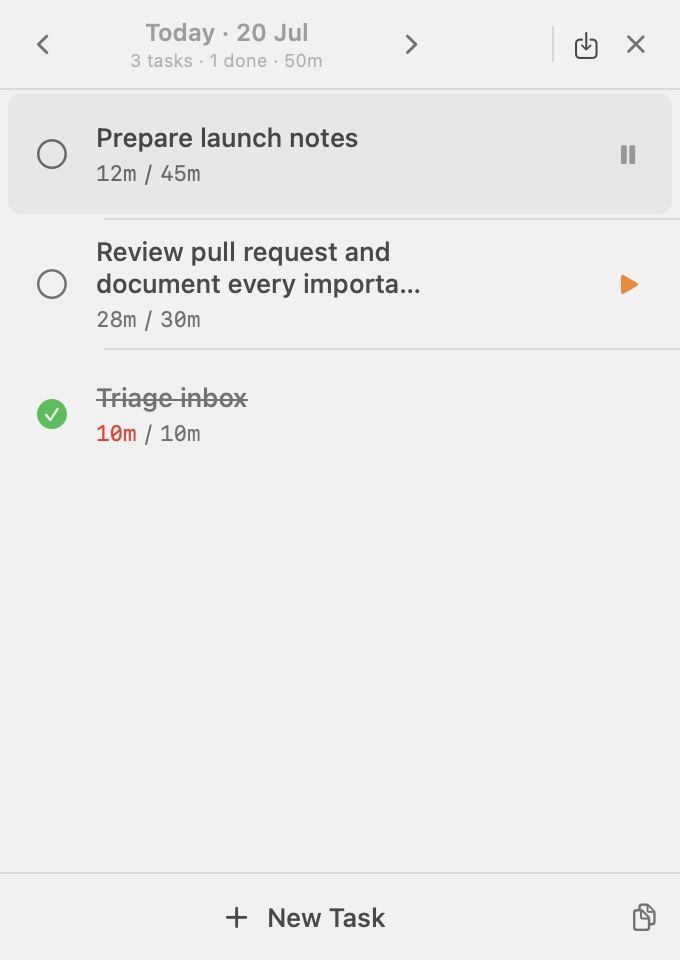
That idea became FocusStation, a native macOS task timer for planning a day, focusing on one task, and reviewing where the time went.
I am a software engineer, but I was not a macOS developer when I started. SwiftUI, AppKit, menu bar lifecycle, popovers, and SwiftData were unfamiliar territory. I used an AI coding agent to help me cross that gap.
The first version arrived quickly.
The reliable version did not.
This is not a story about asking AI for an application and receiving a finished product. It is about the gap between generated software that looks complete and engineered software that survives real use.
The happy path was easy
The first scope sounded almost trivial:
- place an icon in the menu bar;
- open a compact popover;
- create a task;
- start and pause its timer;
- persist tasks locally.
An AI coding agent can generate those pieces surprisingly quickly. It knows the common APIs, can scaffold a SwiftData model, and can connect buttons to observable state.
Within a short time, I could click the menu-bar icon, create a task, and watch its timer advance.
If I had evaluated the application through one careful demonstration, I could have called it finished.
But software is rarely used through one careful demonstration.
I opened and closed the popover repeatedly. I clicked Edit several times. I put the Mac to sleep. I created long task names. I left timers running. I switched dates quickly. I tried to save while state was changing.
That was when the real application started to appear.
A timer is not a number that increases every second
The first important failure involved sleep and wake.
A basic timer often begins with logic like this:
elapsed += 1Run that once per second and the displayed duration appears correct.
But a timer callback does not prove that exactly one second has passed. The process may be suspended when the Mac sleeps. The run loop may be busy. The operating system may delay callbacks.
If callbacks are the source of elapsed time, the timer drifts whenever reality does not follow the callback schedule.
FocusStation moved to timestamp-based timekeeping:
func currentElapsed(at date: Date = .now) -> TimeInterval {
    let liveInterval = startedAt.map {
        date.timeIntervalSince($0)
    } ?? 0

    return accumulatedElapsed + max(0, liveInterval)
}
When a task starts, the application stores its start timestamp. When it pauses, the current interval is added to the accumulated duration. While it is running, the visible value is derived from the timestamp and the current time.
The repeating one-second timer still exists, but it has a much smaller responsibility:
Ticker: tell the interface to render again
Timestamp: determine how much time actually passed
That distinction made the timer resilient to delayed callbacks and system sleep.
It also forced a product decision:
Should a running task continue while the Mac sleeps?
For FocusStation, the answer became yes. Closing the lid should not invent a pause the user never requested. When the Mac wakes, elapsed time catches up from the original timestamp.
The AI could implement either behaviour. It could not decide which behaviour was right without an explicit product rule.
Save succeeded, but the editor came back
The most frustrating bug looked like an input problem.
Creating a task worked. Editing an existing task sometimes required multiple clicks before the name field accepted focus. At another stage, clicking Save persisted the task but left the editor visible. Clicking Save again could create a duplicate in the creation flow.
The Save button was not the root problem.
A text field could publish a delayed state update after Save had already persisted the task and closed the editor. That stale callback could restore an editing state that was supposed to be gone.
The fix was to treat an editor as a session with an identity:
struct TaskEditorState: Identifiable {
    let id: UUID
    var name: String
    var hours: Int
    var minutes: Int
}
Every update now has to belong to the currently active session:
func updateEditor(_ update: TaskEditorState) {
    guard editor?.id == update.id else { return }
    editor = update
}
Once Save or Cancel removes that session, late updates are ignored.
This changed how I described the bug to the AI agent.
The weak question was:
Does clicking Save work?
The useful question was:
Can any sequence of field callbacks cause one editor session to save twice or return after it closes?
We tested 100 Save attempts against the same session. The invariant was not that the first click looked correct. It was that one session could create at most one task.
That is the level at which generated UI code needs to be challenged.
A 340-point popover still needs architecture
FocusStation occupies very little space, but that made layout failures more visible.
At different points:
- long task names crowded the timer controls;
- Edit and Delete buttons shifted the title when they appeared on hover;
- the popover grew in the wrong direction;
- new-task editors opened below the visible area;
- text fields needed repeated clicks before accepting input;
- forced layout calls produced AppKit recursion warnings;
- rebuilding the popover destroyed focus and transient state.
None of the final fixes were visually dramatic.
Task rows received stable columns. Edit and Delete remained hidden until hover, but their space was always reserved. Long names could occupy two lines before truncating. The popover kept a fixed width and calculated its height from visible state:
let desiredHeight =
    headerHeight
    + footerHeight
    + visibleRowHeights

let height = min(
    max(desiredHeight, minimumHeight),
    maximumHeight
)
Long lists scroll only after the popover reaches its maximum height, and the scrollbar remains visually hidden.
Most importantly, the application owns one native status item, one popover, and one shared view model for the life of the process. Timer updates change observable state; they do not rebuild the hosted interface.
The interface became reliable when ownership stopped moving around.
The red carry-over dot revealed the wrong product model
One feature started as a tiny UI request: show a red indicator beside a task left over from yesterday.
Then the questions multiplied.
Should the dot say Day 2? Should it disappear after acknowledgement? Should it return tomorrow? Where should the date appear? How do we expose the explanation without waiting for a delayed native tooltip?
We were trying to perfect an indicator for a deeper modelling problem.
Why was yesterday's task pretending to belong to today?
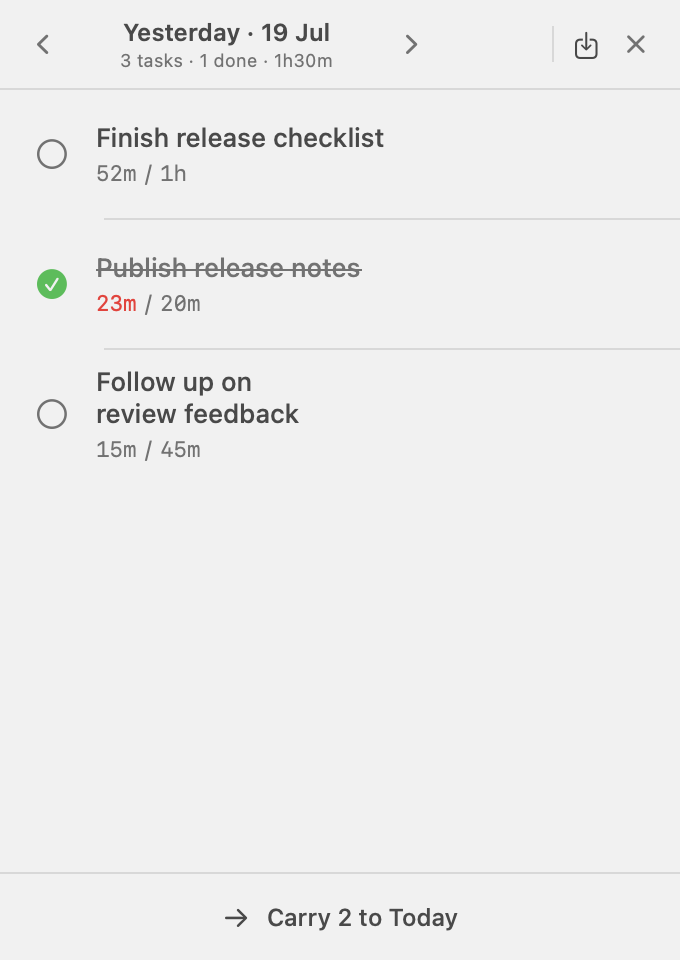
FocusStation eventually became day-specific. Each local calendar date owns its tasks, ordering, elapsed time, and completion state. Past days are history. Today is the execution surface. Future days are for planning.
Moving unfinished work forward creates a new related task instead of rewriting the historical one.
That change also clarified midnight. A task scheduled for today cannot continue invisibly into tomorrow. At the local boundary, FocusStation records elapsed time up to midnight, stops the task, and preserves it on its original date.
The implementation uses calendar arithmetic rather than adding 86,400 seconds. A local day can be 23, 24, or 25 hours around daylight-saving transitions.
The AI helped implement this model, but the important step was recognising that the requested red dot was evidence of the wrong product boundary.
“Done” became the beginning of testing
Once the main workflow felt stable, I asked the agent to stop adding features and attack the application.
That adversarial pass uncovered cases normal clicking had missed:
- an extremely large hour value could overflow;
NaNor infinite durations could break formatting;- legacy data could contain a running task from an earlier day;
- carrying several tasks could partially succeed;
- the same task lineage could be copied more than once;
- invalid calendar keys could normalise into a different date;
- task names beginning with spreadsheet formula characters could become dangerous in CSV;
- the interface displayed “1 tasks.”
Some failures were serious. Some were embarrassing. All existed in code that had previously looked complete.
The final suite grew to 66 tests. The number is less important than the questions behind it:
- What happens when Save is triggered 100 times?
- What happens when persisted data is malformed?
- What happens across leap day, year boundaries, and daylight-saving changes?
- What happens when the Mac sleeps through midnight?
- What happens when 500 hostile task names are exported?
- What happens when editor, timer, and date transitions occur rapidly?
AI was especially useful here. It could generate repetitive inputs, run large state-transition matrices, inspect failures, and keep expanding coverage.
But it still needed invariants:
One editor session creates at most one task.

Only one task can run at a time.

Historical records are never rewritten by carry-forward.

Elapsed time never becomes negative or non-finite.

A batch operation either completes fully or changes nothing.
Without rules like these, “test the app thoroughly” is just another vague prompt.
The AI workflow that worked
The least effective approach was asking for a complete feature in one large prompt.
The reliable workflow was smaller:
- Describe one observable behaviour.
- Ask the agent to inspect the current implementation before changing it.
- Define the invariant and what must not change.
- Identify the state owners and affected boundaries.
- Implement the smallest coherent change.
- Build and test immediately.
- Exercise repeated and hostile interactions.
- Commit only after the state is trustworthy.
For the sleep behaviour, a useful request looked like this:
When the Mac sleeps, a running task must continue accumulating time.
After wake, elapsed time must be derived from its original start timestamp.

Do not persist elapsed time every second.
Do not pause automatically on sleep.
Do not recreate the popover or view model.

Add tests for same-day wake and waking after the local day boundary.
The negative constraints mattered as much as the requested behaviour.
Without them, an agent can solve a local bug by moving state, recreating a view, changing persistence, or introducing another lifecycle problem.
AI worked best as a fast implementation and investigation partner inside boundaries I could explain. It worked poorly when I delegated product rules and architecture as one ambiguous request.
What building this changed for me
FocusStation did not make me a macOS expert.
It taught me that unfamiliarity with a platform no longer has to prevent exploration. AI can explain APIs, map concepts from technologies I know, generate the first implementation, and help investigate failures quickly.
But the developer still has to define reality:
- What should happen during sleep?
- Can more than one task run?
- What happens at midnight?
- Can Save ever create duplicates?
- Which state survives relaunch?
- Which historical facts must never be rewritten?
- What must remain stable while a local bug is fixed?
Those are not syntax questions. They are product and system-design decisions.
The initial FocusStation prototype proved that AI could produce a believable macOS application quickly.
The bugs taught me something more useful: believable is not the same as reliable.
AI made the first version arrive faster.
Engineering began when I stopped trusting the first version.
FocusStation is open source:
- View the source code
- Download FocusStation
- Read the complete technical guide
- Read the build-in-public series